
The Global Stallion Directory
The Stallion Match directory is how you find a stallion to test your mare against. It covers stallions standing at farms worldwide, and the filters narrow a global roster down to the handful worth looking at.
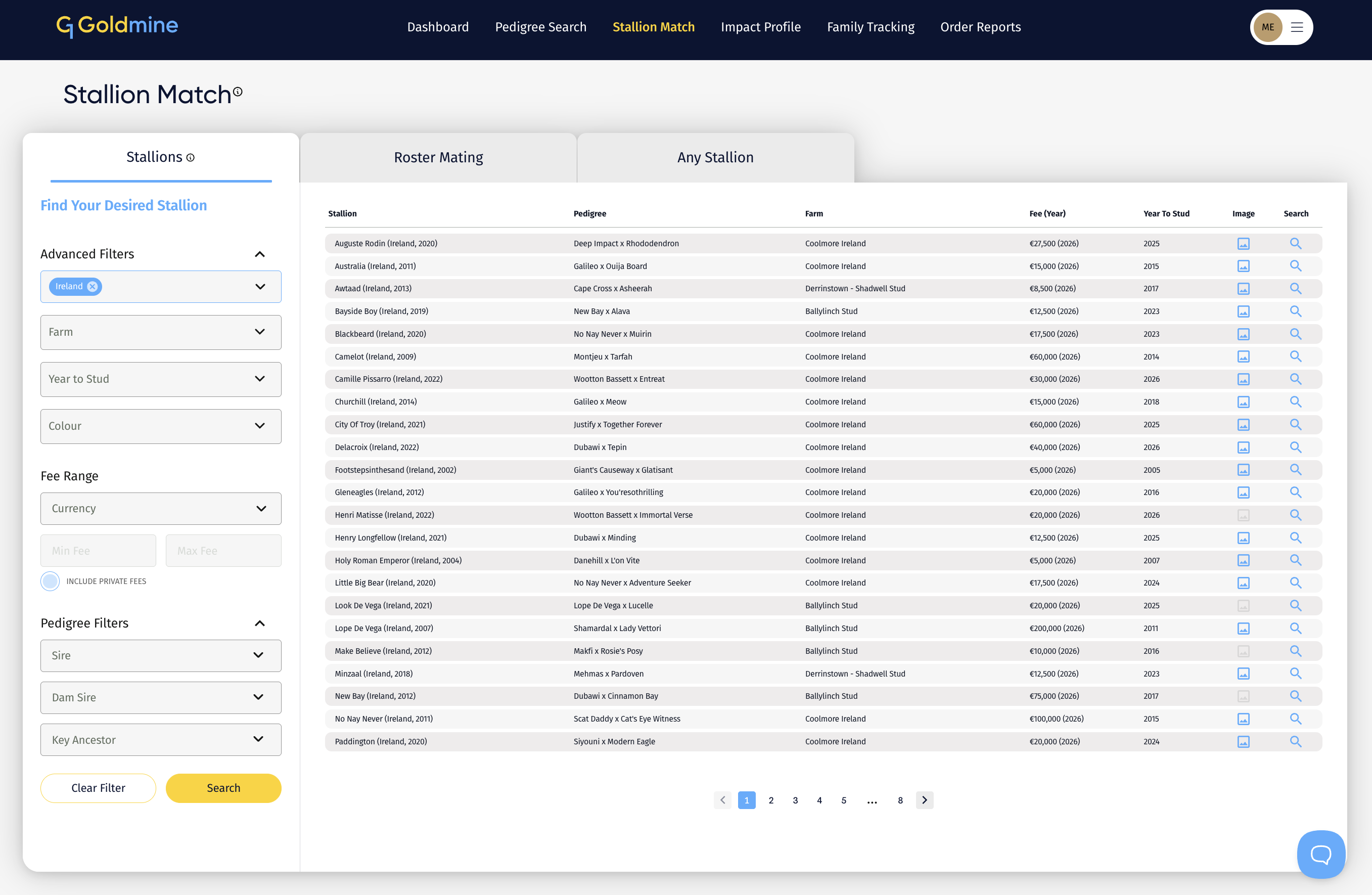
Where to find it
Open Stallion Match from the main menu. The Stallions tab opens by default, with the filter panel on the left under Find Your Desired Stallion.
Set at least one filter, then click Search. Clear Filter resets everything.
The Search button stays grey until a filter is selected, then turns blue. Across G1 Goldmine a grey button means the action is not yet available and a blue one means it is ready, so if a button looks inactive there is usually something still to fill in.
Advanced Filters
Location. Narrows by region, not only by country, so you can filter to somewhere as specific as Western Cape or a state within a country. Usually the first filter to set, since a stallion you cannot practically send a mare to is not a real option.
Farm. Narrows to a single stud farm. To test a mare against a whole farm at once, use Roster Mating instead.
Year to Stud. The season a stallion first stood. This is how you find first-season sires, by filtering to the most recent year. See Service fees, foal crops and first-season sires.
Colour. Narrows by coat colour.
Fee Range
Set a Currency, then a Min Fee and Max Fee. Setting the currency first matters, because fees are quoted locally and a range entered without one will not filter as you expect.
Include Private Fees brings in stallions whose fee is not published. Leave it off if budget is your binding constraint, since you cannot judge affordability without a figure. Turn it on when researching the upper end of the market, where private fees are common.
Pedigree Filters
Sire. Narrows to stallions by a particular sire.
Dam Sire. Narrows to stallions out of mares by a particular broodmare sire.
Key Ancestor. Narrows to stallions carrying a particular influence anywhere in the pedigree.
Key Ancestor is the one worth experimenting with. If you know an influence works with your mare's family, filtering to stallions carrying it will surface horses you would not have thought of, including ones standing at farms you do not follow.
Reading the results
Results are returned as a table with the following columns.
Stallion. Name, with country and year of birth.
Pedigree. The stallion's own sire and dam, shown as sire x dam.
Farm. Where he stands.
Fee (Year). The service fee and the season it applies to. Stallions whose fee is not published show Private Fee. See Service fees for what a fee actually buys.
Year To Stud. The season he first stood, which tells you how much progeny data exists.
Image. A photograph is available where this icon is blue. Grey means none has been supplied. See Stallion images and profiles.
Search. Opens the match screen for that stallion.
The Pedigree column is worth scanning rather than skipping. It lets you spot the sire lines represented across a whole roster at a glance, which is quicker than opening each stallion in turn.
From a result to a match
Clicking a stallion opens the match screen, with his pedigree already loaded and a Select Broodmare field beneath it. Choose your mare and the analysis panels populate.
Back to List returns you to your results with the filters still applied, so you can work through several stallions without setting up the search again.
See Stallion Match explained for how the matching works, and Understanding the ratings for what a Perfect Match or 20/20 Match means.
Promoted and non-promoted stallions
The Stallions tab covers stallions promoted by their farms, which carry fuller profiles with current fee and farm information.
To match against any male horse in the database instead, use the Any Stallion Match tab. That is the mode for assessing a stallion whose farm has not listed him, an unproven sire, or a colt still racing.
A practical order of work
- Filter by Location to where you can realistically send a mare.
- Set a Fee Range you would actually pay.
- Add Year to Stud if you are specifically after first-season sires.
- Run the search, then match your mare against the ones that look plausible.
- Use Roster Mating when several candidates stand at the same farm.