
Comparing Two Pedigrees Side by Side
Compare Pedigrees puts two pedigrees side by side and measures how much they have in common. It answers a question the other tabs do not: how closely does one horse resemble another?
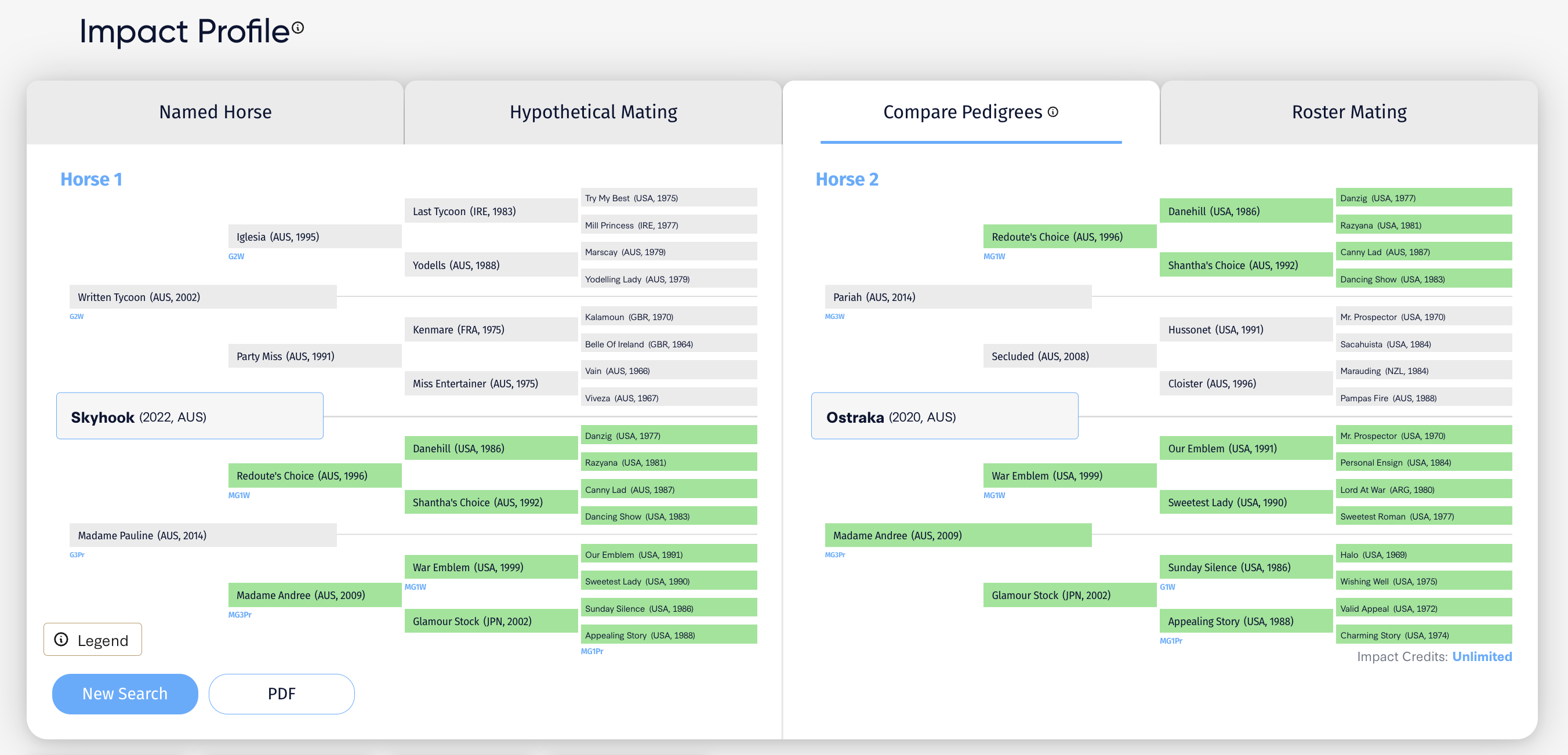
Setting up a comparison
Open Impact Profile and click the Compare Pedigrees tab. The screen splits into Horse 1 on the left and Horse 2 on the right.
Each side accepts either of two things:
- Select Horse. A named horse already in the database.
- Select Sire and Select Dam. A hypothetical mating built from two parents.
The two sides are independent, so you can mix them. Comparing a proposed mating against a horse that already exists is one of the more useful things this tab does.
Reading the pedigree overlap
Once both sides are filled, matching ancestors are highlighted in green on both pedigrees at once. Two shades are used, and the difference between them is the whole point.
- Light green. The ancestor appears in the same half of both pedigrees, but in a different position.
- Dark green. The ancestor matches exactly, appearing in the same position in both.
Dark green is the stronger signal. A shared ancestor sitting three generations back on one side and five on the other is a looser relationship than the same ancestor occupying the same slot in both.
Matching is assessed within each half of the pedigree. An ancestor on the sire side of one horse matching the dam side of the other does not count, because that describes a different genetic relationship.
Scan for dark green first. A comparison carrying several dark green blocks close to the horse describes two genuinely similar pedigrees. One where the green is all light and all distant describes two horses that merely share the common stock most thoroughbreds carry.
The four measures
Beneath the pedigrees sit four figures, which are the highlighting expressed as numbers.
Similarity Score. How much of the two pedigrees is shared, as a percentage. This counts both shades of green.
Shared Ancestors. How many ancestors appear in both pedigrees, in any position within the same half.
Exact Score. The percentage matching by exact position, so dark green only.
Exact Ancestors. How many ancestors match by exact position.
Read the two pairs against each other. If Shared Ancestors is high and Exact Ancestors is near zero, the two pedigrees contain similar material arranged differently, which is a weaker resemblance than the headline percentage suggests.
Beneath the figures, a note names the ancestors driving the similarity, so you can see what the score is built on rather than taking the percentage at face value.
Why similarity matters
Similarity is the measure underneath G1 Goldmine's ratings. A pedigree earns a 20/20 Match when two or more Graded Stakes winners share more than 20 ancestors with it within five generations.
Compare Pedigrees lets you run that comparison yourself, between any two horses you choose. Set a proven performer against a proposed mating and you can see directly how much the two have in common, and which ancestors account for it.
Three ways to use it
A proposed mating against a horse that worked. If a mare has already produced something good, compare that pedigree against a proposed one. High similarity means you are repeating much of what worked. Low similarity tells you how much you are changing.
Two yearlings at a sale. Compare a horse you are considering against a proven performer with a similar page, and see whether the resemblance is real or only in the catalogue.
Two matings for the same mare. Compare each proposed foal against a target pedigree to see which comes closer.
Reading the result honestly
Similarity is not quality. Two ordinary pedigrees can be highly similar. The score tells you how alike they are, not how good either is. For that, run each through Named Horse or Hypothetical Mating.
Check what is driving it. A high score resting on one heavily duplicated ancestor is a narrower resemblance than the same score spread across several.
Position beats presence. Exact matches carry more weight than shared ones, which is why both are reported separately.
Exporting
Click PDF to export the comparison. New Search clears both sides. The Legend button explains the highlighting at any time.
Comparing more than two
This tab handles two at a time. To assess one mare against an entire farm roster in a single pass, use Roster Mating, then bring the leaders back here for a closer look.